
There are many options available to change the timesheet format. You can customise it to suit your requirements.
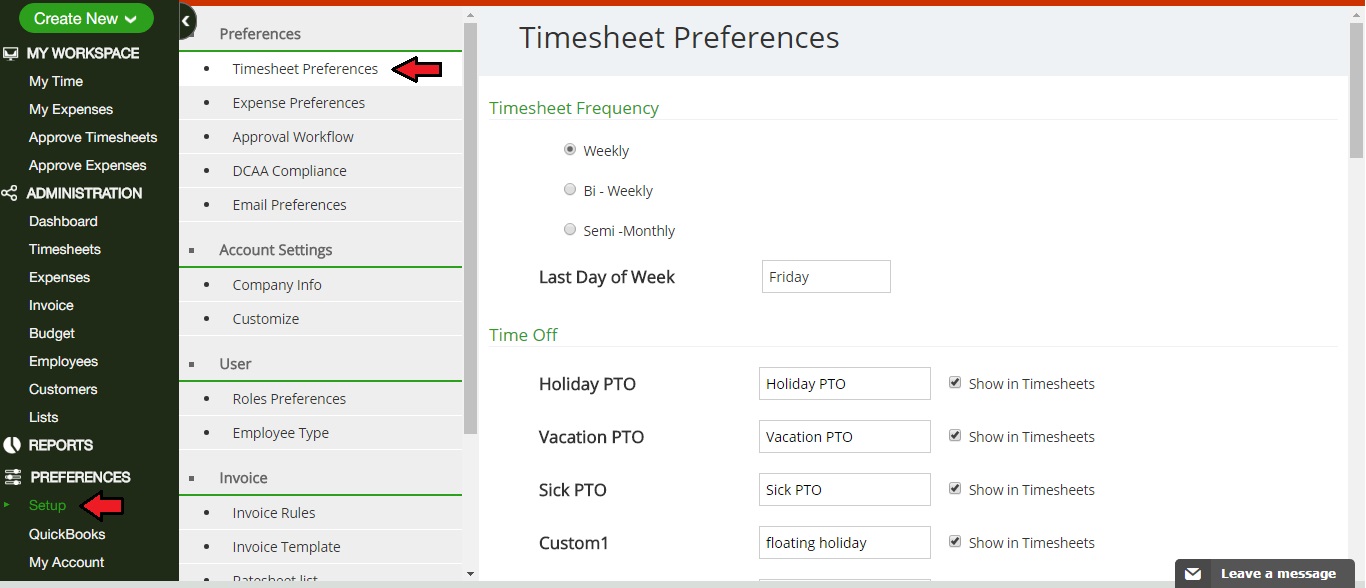
1. Timesheet Frequency - There are four different views of Timesheet: To do View, Day View, Week View and Month View. Under Week view, you can select different frequencies like Weekly or Bi-Weekly or Semi-Monthly.
2. Time Off - This will allow you to enter the time off entries for different reasons you have taken time off.
3. Timesheet Layout - Here, you can specify what fields are visible on timesheets.
4. Classes - Here, you can choose whether employees select a class or you can use class allocation rules to automatically assign classes to timesheets.
5. Bill Project for Time - You can make your timesheets Billable or Non-billable by default or you can further customise by using billable rules for specific employees or customers.
6. Submit Time - You can make the fields like Description and Classes mandatory for employees before they submit time.
To make these changes you can click on Setup >> Timesheet Preferences
0 Comments